Back Up Your Website
Install and configure UpdraftPlus for WordPress backups.
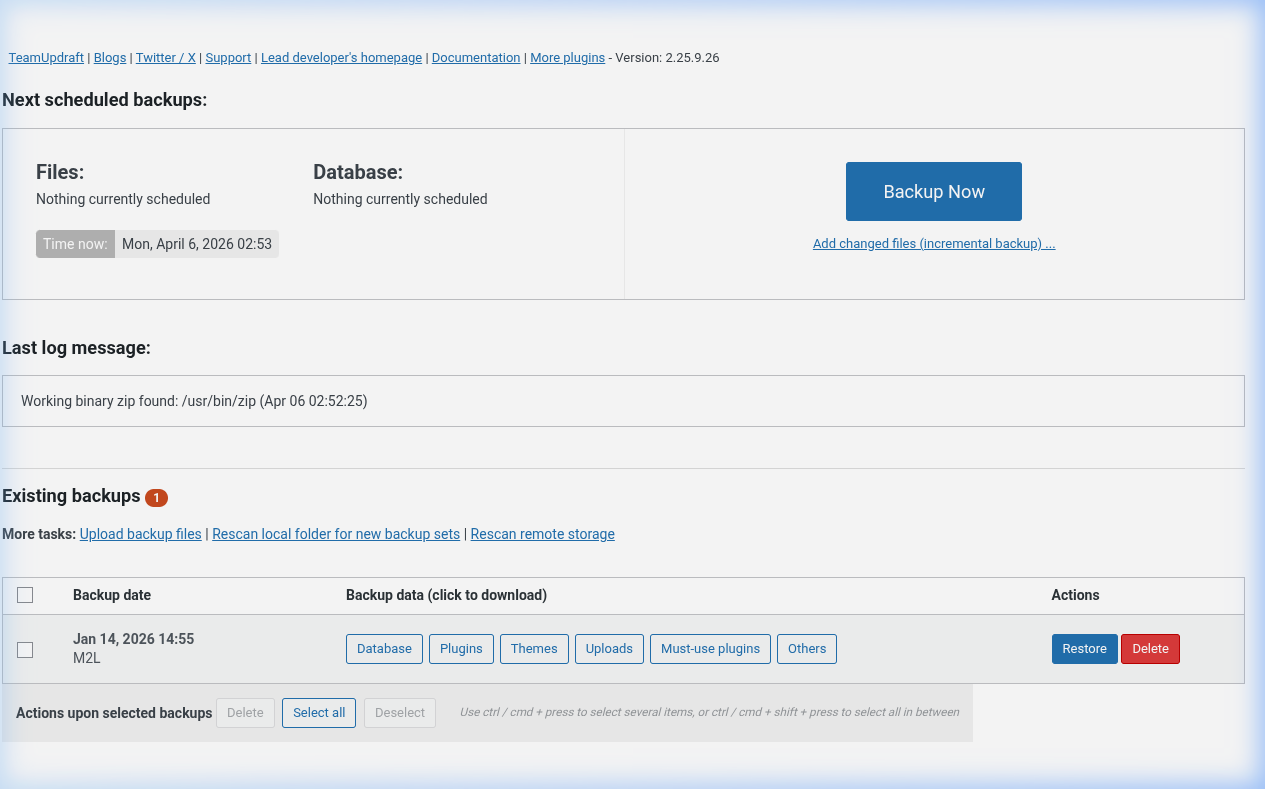
Procedure
Install
1. Go to Plugins > Add New
2. Search "UpdraftPlus"
3. Click Install Now, then Activate
Configure
1. Go to Settings > UpdraftPlus Backups
2. Set file backup schedule (daily/weekly)
3. Set database backup schedule
4. Choose remote storage (Google Drive, Dropbox)
5. Connect your account
Manual backup
1. Go to Settings > UpdraftPlus Backups
2. Click Backup Now
3. Choose files + database
4. Check "Send to remote storage"
5. Click Backup Now
Restore
1. Go to Settings > UpdraftPlus Backups
2. Click Existing Backups
3. Find the backup, click Restore
4. Select components to restore
5. Click Restore
Delete old backups
1. Go to Existing Backups
2. Click Delete on the backup
Key Points
- Test backups by restoring to staging
- Store backups offsite (not just on server)
- Schedule backups during low traffic
tl;dr
Install → Configure storage → Backup Now. Restore from Existing Backups tab.